
How Can E-Signatures Speed Up Your Contract Process?
Introduction
Here is a scenario most business owners know too well. You send a contract on Monday. By Thursday, you are still waiting. You follow up. The client says they printed it but the scanner is broken. You wait until next Tuesday. By then, you have lost momentum — and sometimes the deal itself.
This is not a rare edge case. According to Forrester Research, 45% of companies spend a full week or more just to get a single contract signed using traditional methods. That is not a minor inconvenience — it is a measurable drain on revenue, relationships, and growth.
This blog explains exactly how electronic signatures solve this problem — not just in theory, but with real workflows, industry-specific use cases, and practical steps you can take today. You will also learn how to pick the right esignature software for your business, what free tools actually offer, and why WeSignature is built for serious business use.
Key Takeaways
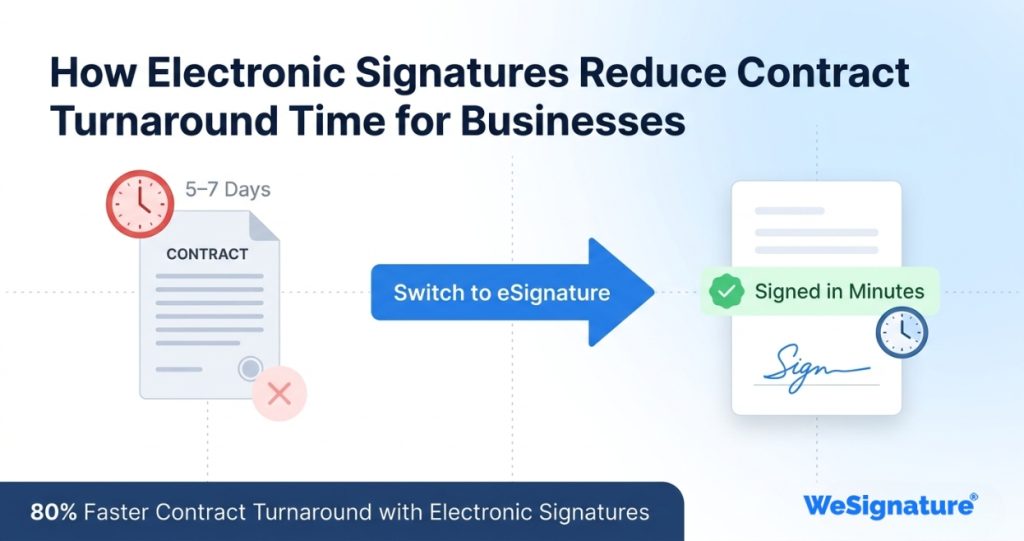
- Electronic signatures reduce contract turnaround time by up to 80% — most agreements close the same day
- The entire online document signing process takes under 5 minutes — from sending to signed
- eSignatures are legally binding in the USA under the ESIGN Act and UETA since 2000
- Every document signature includes an automatic audit trail — timestamp, IP, device, and signer identity
- Industries from real estate and legal to insurance and construction all benefit from electronic signature solutions
- Free tools have real limitations — choosing the right e signature software protects your compliance and security
Why Traditional Contract Signing Slows Down Business Growth
Paper-based contract signing is not just slow — it creates a chain of friction at every single step. Think about what actually happens when you send a physical or PDF contract for wet signature:
- You create the document and email a PDF attachment
- The recipient downloads it, and has to print it — if they have access to a printer
- They sign it by hand, then scan or photograph it — introducing quality issues
- They email it back, often in a degraded format that’s hard to read or archive
- You check it, file it manually, and hope nothing was missed
Each of those steps is an opportunity for delay, error, or abandonment. Add a public holiday, a business trip, or a broken printer and that contract can sit unsigned for weeks. Meanwhile, your competitor sent a digital signing link that was completed in four minutes.
The financial impact is real. Paper document processing costs between $6 and $8 per document. Beyond printing costs, consider the staff time spent chasing signatures, re-sending documents, and manually filing completed contracts. For a business handling 200 contracts annually, that adds up to thousands of dollars in hidden administrative overhead. If you are looking to eliminate these inefficiencies, understanding how to integrate electronic signatures in your workflow is the clearest place to start.
The bigger cost is the deals you lose. High-intent buyers make decisions fast. If your contracting process introduces three days of friction at the moment a prospect says yes, some of them will say no before the ink dries.
What Is an Electronic Signature and How Does It Work?
An electronic signature is any digital indication that a person intends to agree to the terms of a document. In legal terms, it carries the same binding authority as a handwritten signature — but the experience for the signer is fundamentally faster and simpler.
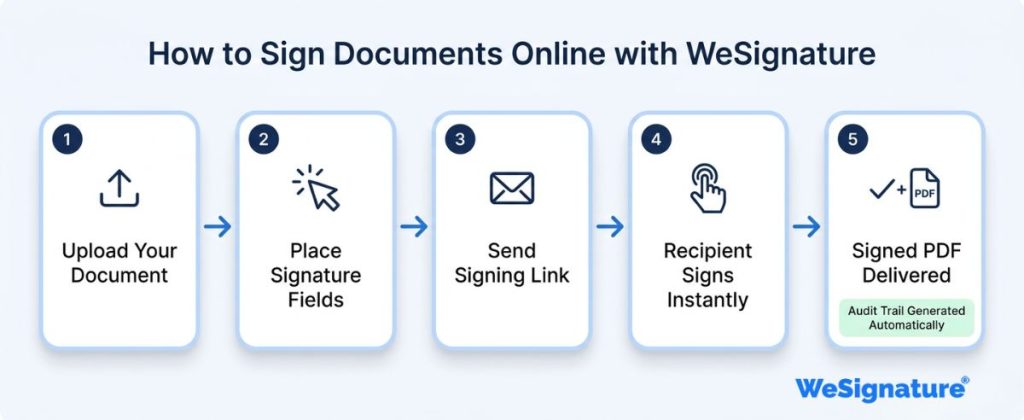
Here is what actually happens when you use a platform like WeSignature to create an electronic signature:
- You upload a document — PDF, Word file, or contract template — to the platform
- You place signature fields exactly where signatures, initials, or dates are needed
- The recipient gets a secure email link — no account required to sign
- They open it in any browser, review the document, and sign with a click, tap, or drawn signature
- You receive an instant notification and a completed, tamper-proof signed PDF
- A full audit trail is generated — timestamp, IP address, device, and signer identity
The create signature online process is device-agnostic — signers can complete it on a desktop, tablet, or smartphone. No software download is needed. No account creation is required on the recipient side. The friction is as close to zero as any business process can get. For individuals who prefer a drawn style, you can also create a handwritten signature online and save it for reuse across every future document.
How Electronic Signatures Speed Up Contract Processes
The performance gap between paper and digital contract signing is not marginal. It is structural. According to Grand View Research, businesses that implement electronic signature online workflows experience up to 80% reduction in contract turnaround time. Here is what the data actually looks like in practice:
These numbers reflect a structural change, not just a convenience upgrade:
- 80% of agreements signed electronically are completed within one business day
- 44% of documents are signed within 15 minutes of the request being sent
- 28% faster time-to-revenue reported by businesses that replaced paper with digital signing
- Up to 85% reduction in document processing cost per transaction
This is what makes electronic signature software genuinely transformative for sales cycles, client onboarding, and operational efficiency — not just a digital convenience, but a measurable business performance driver.
Step-by-Step: How to Sign Documents Online with WeSignature
Whether you are sending an electronic signature PDF to a client or collecting multiple signatures on a contract, the process with WeSignature is straightforward. Here is the full workflow:
Sending a Document for Signature
- Log in to your WeSignature account (or start a free trial — no credit card required)
- Upload your document — PDF, DOCX, or use a saved template
- Place signature fields by dragging and dropping them where needed
- Add recipient email addresses and set signing order for multi-party agreements
- Click Send — recipients receive a secure signing link instantly
Signing a Document as a Recipient
- Open the email and click the secure signing link
- Review the document in your browser — no download or app required
- Click the signature field and create signature online by drawing, typing, or selecting a style
- Click Finish — the signed document is delivered to all parties automatically
For electronic signature PDF workflows specifically, WeSignature locks the document after signing — making it tamper-evident and court-admissible. The completed file is stored in your account with a full certificate of completion.
| Tired of Waiting Days for Signed Contracts?See how WeSignature cuts contract turnaround from days to minutes — free trial, no credit card needed. Start Your Free Trial → |
Real Business Use Cases: How Different Industries Use Electronic Signatures
The practical value of electronic signature software varies by industry — but the outcome is consistent across all of them: less time waiting, fewer errors, and faster revenue. Here is how six key industries are putting it to work.
Sales Teams — Close Deals Before Momentum Fades
Sales is where contract speed matters most. A prospect who says yes at 3pm on Friday and receives a paper contract may not see it until Tuesday. With electronic signature for sales, that same prospect receives a signing link in seconds and can complete it from their phone during the call. The result: less deal slippage, shorter sales cycles, and higher conversion rates from verbal yes to signed agreement.
Real Estate — Sign Across Geographies Without Delays
Purchase agreements, lease contracts, and disclosure forms in real estate often involve multiple parties across different locations. E-signature for real estate eliminates the need for in-person meetings or overnight courier services. Buyers, sellers, and agents can review and sign in sequence — from any device, anywhere — without slowing down the transaction timeline.
Insurance — Compliant Forms Without the Paperwork
Insurance applications, policy acknowledgements, and claims forms require accurate, timestamped signatures for regulatory compliance. eSignature for insurance automates this process while generating a court-admissible audit trail that satisfies both state and federal documentation requirements—without a single piece of paper.
Construction — Approvals That Keep Projects Moving
In construction, a delayed subcontractor agreement or unsigned change order can halt an entire project. Construction electronic signature workflows allow project managers to send, collect, and store approvals from contractors in the field — via mobile — without returning to the office. Documents are signed the same day rather than waiting for the next site visit.
Education — Student and Parent Forms at Scale
Schools and universities process thousands of enrolment forms, consent agreements, and financial aid documents each semester. eSignature for education replaces paper form collection with digital workflows — reducing administrative burden, eliminating lost paperwork, and improving completion rates significantly.
Legal — Engagement Letters and Client Agreements Instantly
Law firms depend on signed engagement letters before any billable work can begin. eSignature solutions for legal teams mean new client agreements can be sent and returned within minutes of the intake call—reducing the delay between client acquisition and billable hours. Every signed document includes an audit trail that holds up in court.
Cost and Efficiency Benefits of E-Signature Software
The business case for switching from paper to e-signature software is straightforward when you look at the actual numbers side by side.
| Cost Factor | Paper Contracts | Electronic Signatures |
|---|---|---|
| Cost per document | $6 – $8 | $0.50 – $1.00 |
| Average turnaround time | 5–7 business days | Under 24 hours |
| Staff time per contract | 25–45 minutes | 2–5 minutes |
| Error / rework rate | ~15% | Under 2% |
| Storage & filing cost | High (physical) | Cloud – near zero |
| Audit trail | Manual / unreliable | Automatic & tamper-proof |
| Legal admissibility | Variable | ESIGN Act compliant |
For a business processing just 100 contracts per year, the direct cost saving is $500–$700 annually. For a sales team handling 1,000+ agreements, the savings scale proportionally — and the productivity gain from eliminating manual follow-up is worth far more than the direct cost reduction.
The best e signature software for small business delivers this ROI without requiring expensive enterprise contracts or lengthy implementation timelines. Platforms like WeSignature are production-ready in under 10 minutes.
Electronic Signature Free vs Paid Tools: What You Actually Get
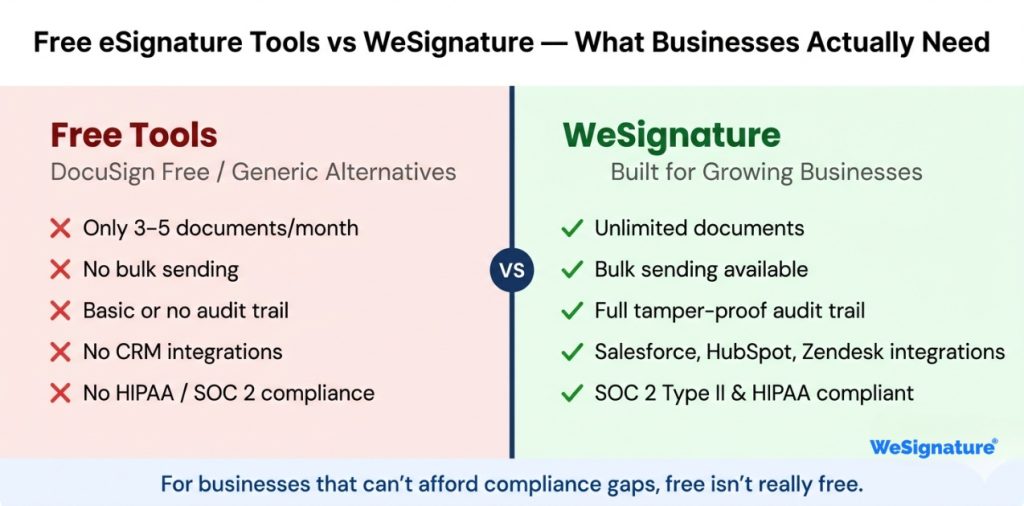
If you have been comparing options, you have probably encountered electronic signature free plans or searched for DocuSign free alternatives. Free tiers have genuine value for low-volume users — but they come with real limitations that matter for business use.
| Feature | Free Tools (DocuSign Free / Alternatives) | WeSignature Paid Plans |
|---|---|---|
| Documents per month | 3–5 (limited) | Unlimited |
| Audit trail | Basic / limited | Full tamper-proof trail |
| Templates | None or 1 | Unlimited reusable |
| Bulk sending | Not available | Available |
| CRM integrations | Limited or none | Salesforce, HubSpot, Zendesk |
| HIPAA / SOC 2 compliance | Not included | Included |
| Branding / white-label | Not available | Custom branding options |
| Priority support | Community only | Dedicated support |
Free tools are fine for occasional personal use. If you are running a business — particularly in a regulated industry like healthcare, finance, or legal — you need a platform that meets compliance requirements, integrates with your existing tools, and scales with your volume. Explore WeSignature pricing to find the right plan for your team size and usage.
How to Choose the Right Electronic Signature Solution
Not all e signature software is built the same. Here are the five factors that matter most when evaluating platforms for business use:
1. Legal Compliance
Your platform must comply with the ESIGN Act and UETA in the USA. If you operate internationally, look for eIDAS (EU) and equivalent frameworks. WeSignature meets all major US and international standards out of the box.
2. Security Standards
Look for AES-256 encryption, SOC 2 Type II certification, and multi-factor authentication. These are not optional for business use — they are the baseline for legally defensible signed documents.
3. Integration Depth
Your electronic signature online platform should connect natively with the tools your team already uses — CRM, helpdesk, HR software, or project management. Disconnected tools create manual re-entry work that eliminates most of the efficiency gain.
4. Scalability
A platform that works for 10 documents a month needs to handle 1,000 without performance issues or per-document pricing surprises. Evaluate bulk sending, template libraries, and team management features before committing.
5. Ease of Use for Recipients
The best document signer experience requires no account creation, no software download, and no learning curve for the person receiving your contract. If signing feels like work, your completion rates will suffer. Test the recipient experience before you choose a platform. For a full evaluation framework, see these 10 tips for choosing the best electronic signature for your business — covering everything from compliance to integration depth.
Frequently Asked Questions
1. Is electronic signature legal in the United States?
Yes, completely. Electronic signatures have been legally binding in the USA since 2000 under the ESIGN Act and the Uniform Electronic Transactions Act (UETA). They carry the same legal weight as a handwritten signature for the vast majority of commercial, employment, and consumer documents. Certain instruments — such as wills, court orders, and some real estate deeds — may still require wet ink signatures depending on state law.
2. How do I sign a PDF online?
With WeSignature, signing an electronic signature PDF takes under two minutes: upload your PDF, place signature fields, send the signing link to recipients, and receive the completed signed document automatically. Recipients sign directly in their browser — no account, no app download required.
3. Are free e-signature tools safe for business documents?
Free electronic signature free tiers from most providers offer basic security — adequate for personal use and very low-volume agreements. However, they typically lack SOC 2 compliance, advanced audit trails, and HIPAA-compatible storage. For regulated industries or any business handling sensitive contracts, a paid plan with proper compliance certification is essential.
4. Which industries benefit most from electronic signatures?
Virtually every industry that handles contracts benefits — but the highest-impact sectors are real estate, legal, insurance, healthcare, construction, education, and sales. Any workflow that currently involves printing, scanning, mailing, or manually chasing signatures will see immediate improvement.
5. What is the best e-signature software for small businesses?
The best e signature software for small business combines ease of use, legal compliance, and fair pricing at low volumes. WeSignature offers a free plan for individuals and scalable paid plans for growing teams — with no per-document fees, full audit trails, and integrations with the tools small businesses already use. Compare WeSignature plans here.
Conclusion
Every day you rely on paper-based contract signing, you are accepting a structural disadvantage. Your competitors using electronic signature software are closing the same deals faster, with less friction, at lower cost, and with better legal protection.
The shift to online document signing is not a technology experiment anymore — it is the operational standard for businesses that take customer experience and revenue efficiency seriously. The ESIGN Act has made it legally solid for over two decades. The tools have never been more accessible or more capable.
For a deeper look at how AI is reshaping business software beyond signatures, the AI Software Development Guide covers how intelligent automation is transforming workflows across every industry.
| Sign Contracts Faster. Close More Deals.WeSignature gives your business legally compliant, tamper-proof electronic signatures — free to start, scales as you grow. Start Free — No Credit Card Required → |
