
How to Send Documents for Electronic Signature Online
If you’re trying to accelerate approvals, reduce back-and-forth, and still keep documents defensible, the winning approach is a repeatable “prepare, send, verify, store” process supported by clear signer consent, identity/authentication, and strong record retention.
The mistake most teams make is assuming it’s just about emailing a PDF. It’s not. A proper electronic signature workflow is really about preparing the right document, sending it to the right people, verifying the signing activity, and storing the final signed record in a secure, easy-to-retrieve format.
That matters because speed alone is not enough. You also want a process that reduces back-and-forth, keeps documents defensible, and helps your business close deals, approvals, enrollments, and agreements faster.
Under the U.S. Electronic Signatures in Global and National Commerce Act (E-SIGN), electronic signatures and records generally cannot be denied legal effect solely because they are electronic, provided the process is conducted properly, and the records can be retained and reproduced later. In other words, yes, electronic signatures can absolutely work for serious business workflows. The key is using the right process.
This guide shows exactly how to send documents online for signature, and it maps practical workflows for seven U.S. industries (Insurance, Construction, Education, Legal, Real Estate, Technology, Sales).
How to Send Documents for Electronic Signature Online: Quick Answer
If you want the short version, here’s the basic process:
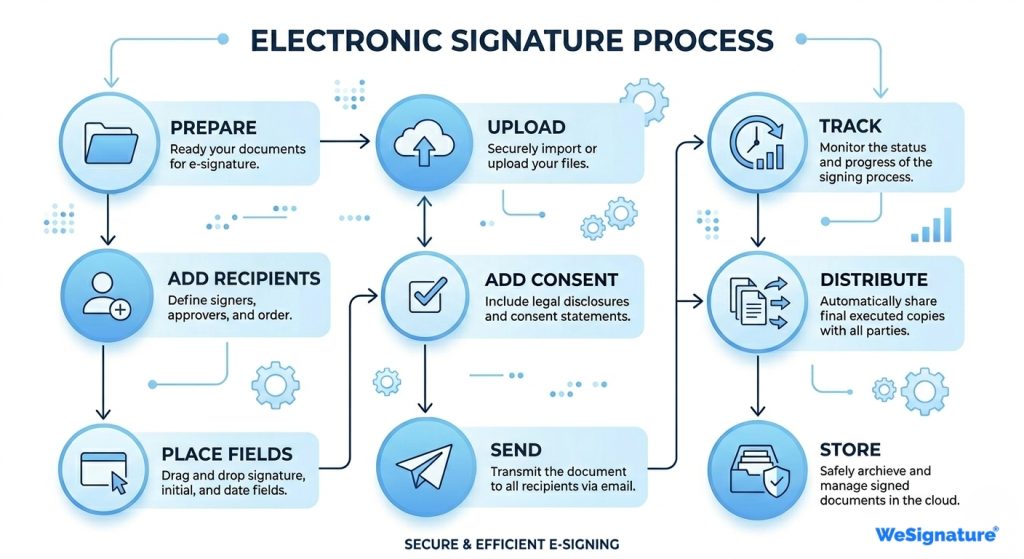
- Prepare the final document
- Upload it to your eSignature platform
- Add recipients and define signer order.
- Place signature and required fields
- Add consent, authentication, reminders, and expiration settings
- Send the document for signature
- Track completion and follow up if needed
- Distribute the signed copy
- Store the final signed record and audit trail securely
That’s the core electronic signature process. Now let’s go through it properly.
What It Really Means to Send Documents for eSignature
When you send documents for an electronic signature, you’re not simply forwarding a file. You’re creating a controlled signing event where the signer’s intent is clear, the signer’s identity is verified, and the completed record can be retained for future reference.
That is what distinguishes a casual digital exchange from a structured business workflow. It’s also why businesses in legal, insurance, real estate, education, technology, construction, and sales rely on eSignature tools rather than the manual print-sign-scan process.
If you want to understand how this process holds up legally, you can explore our detailed guide on signature legality, compliance, and security in the US.
Step 1: Prepare the Document First
Before you send anything, make sure the document is final.
This sounds obvious, but it’s where many workflows break. Wrong names, missing terms, blank fields, outdated pricing, or incorrect attachments all create friction later. If your team fixes these issues before sending, you avoid unnecessary delays and resends.
At this stage, you should make sure the document includes the correct parties, the final pricing or agreement terms, and no missing information. If the document is part of a repeatable workflow, templates are also useful here.
Step 2: Decide the Signer Order
Next, determine who needs to sign and in what order.
Some documents can be signed by all parties at once. Others need a specific sequence. For example, internal approval may be required before the client signs, or one department may need to review the document before it is sent externally.
That’s why defining the signer order early matters. It keeps the process clear and avoids confusion once the document is in motion.
Step 3: Add Signature Fields and Required Inputs
Once your recipients are set, place the fields each signer needs to complete.
This usually includes signatures, initials, dates, names, addresses, checkboxes, or custom fields, depending on the type of agreement. This step is what transforms the document from a static file into an actual eSignature workflow.
If the fields are missing or unclear, the signer’s experience becomes frustrating. If they are placed correctly, the process feels simple and intuitive.
Step 4: Add Consent and Authentication Settings
This is one of the most important steps, and it’s also one of the most overlooked.
If required for your workflow, add clear consent language. In some consumer-facing contexts, affirmative consent and disclosure requirements matter, especially when documents are delivered electronically rather than on paper.
You should also choose the right authentication level. In some cases, a secure email link is enough. In others, SMS verification, OTP, or stronger identity verification may be more appropriate. The right choice depends on the document type, industry, and level of risk.
Step 5: Send the Document and Configure Reminders
After that, send the document for signature.
A good platform should let you send the request, set reminders, and define an expiration date. That way, you’re not manually chasing every signer. Instead, the system helps move the document forward.
This is where businesses begin to feel the real benefit of electronic signatures. Instead of slow email threads and manual follow-ups, the process becomes structured, trackable, and much faster.
Step 6: Track Status and Follow Up
Once the document is out, your job is not over.
You need to know whether the signer opened it, signed it, ignored it, or needs a reminder. This is where tracking becomes valuable. A proper eSignature platform like Wesignature gives visibility into signing progress so your team can follow up at the right time.
This is especially useful in sales, legal, and real estate workflows where timing matters and stalled documents can delay revenue or approvals.
Step 7: Distribute the Signed Copy and Store It Properly
After all parties sign, distribute the completed document and store it securely.
This final step matters more than many businesses realize. E-SIGN is not only about allowing electronic signatures. It also emphasizes retention. Electronic records need to be capable of being retained and accurately reproduced later.
That means the finished document and its audit trail should be stored in a system that allows them to be found, reviewed, and reproduced if needed. This is especially important if a signature is later questioned or if the business needs to prove what was signed and when.
Why Record Retention and Audit Trails Matter
Most business teams do not get into trouble because electronic signatures are inherently invalid. They get into trouble because the process around them is sloppy.
Maybe consent was unclear. Maybe no one can retrieve the signed record. Maybe the document trail is incomplete. Maybe signer activity cannot be shown later.
That is why a strong eSignature audit trail matters. It provides your business with a clearer record of timestamps, actions, and the signing flow. It also makes your documents easier to defend if questions come up later.
Important U.S. Legal and Compliance Guardrails
Electronic signatures are widely accepted, but not every document should be treated the same way.
E-SIGN includes exceptions. Certain court-related documents, some cancellation or termination notices, and documents like wills, codicils, and testamentary trusts fall outside the general rule. That means businesses in regulated categories need to align their document workflows with what is actually permitted.
So while a normal contract or agreement may be easy to send online, some workflows require special handling, legal review, or state-specific processes. That does not weaken the case for eSignatures. It simply means businesses need to use them intelligently.
Industry Workflows: How Different U.S. Teams Use eSignatures
One of the strongest parts of your draft is that it doesn’t stop at theory. It shows how this process works across industries. That should stay, because it adds topical relevance and conversion value.
Insurance
Insurance teams often use eSignatures for policy applications, endorsements, claims paperwork, beneficiary updates, and settlement documents. In practice, the biggest benefit is removing delays that block service or revenue.
A typical insurance workflow may include a template packet with disclosures, optional add-ons, and conditional routing between policyholder, spouse, underwriting, or agent. If the document contains PHI or intersects with HIPAA-regulated processes, safeguards and Business Associate Agreement considerations also become relevant.
Construction
Construction teams are not just signing contracts. They are moving projects forward.
That includes subcontractor onboarding, change orders, RFIs, pay applications, approvals, and closeout paperwork. A clean eSignature process helps eliminate site delays caused by paperwork bottlenecks.
Template packets, role-based routing, and consistent storage conventions are especially valuable here. Construction workflows may also intersect with notarization or recordation requirements, depending on the document type and state.
Education
Education workflows look small until you add them up. Enrollment forms, permission slips, student services paperwork, staff onboarding, and approvals all benefit from a faster digital signing process.
Authentication and clear records matter here, especially in privacy-sensitive contexts. Your original draft correctly points out that FERPA allows electronic consent when the process identifies and authenticates the person and clearly indicates approval. That’s an important trust point and should stay.
Legal
Legal teams care about enforceability and client experience.
That’s why standardized templates, clause initials, sequential routing, and clean retention practices matter. Legal professionals are often less concerned with whether e-signatures are possible and more concerned with whether the signing record will hold up when it matters.
Real Estate
Real estate is one of the clearest examples of why businesses search for how to send documents for electronic signature online in the first place.
Deals move fast, timelines matter, and multiple parties are involved. Listings, buyer agreements, lease packets, disclosures, and addenda are all strong use cases for eSignatures. At the same time, some real estate processes also involve notarization-heavy steps or notice categories that require more careful handling.
Technology
Technology teams want a signing process that is not just digital but efficient.
That usually means templates for MSAs, DPAs, order forms, and SOWs, along with role-based access and, in some cases, API or webhook-based automation. For SaaS and technology companies, the signing experience is part of the customer experience. The smoother it is, the easier it becomes to activate users and reduce friction.
Sales
Sales teams want speed and visibility. They use eSignatures to send proposals, order forms, renewals, and agreements without slowing deals down. The best workflows use prefilled fields, internal approvals, reminders, and, sometimes, payments within the same signing process. That is where eSignature stops being an admin tool and becomes a revenue tool.
How to Choose the Right eSignature Tool
Most businesses are not really shopping for an eSignature tool. They are shopping for an outcome. They want documents signed faster, fewer delays, cleaner records, and fewer compliance headaches.
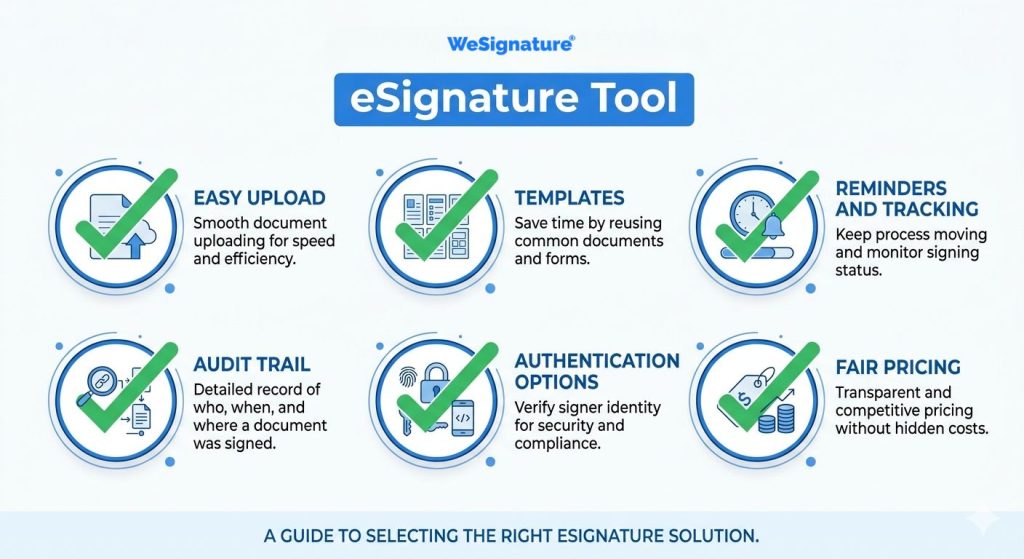
So when choosing a platform, look for:
- easy document upload and field placement
- templates for repeatable workflows
- reminders and tracking
- audit trails and secure storage
- strong authentication options
- pricing that fits your team without unnecessary limits
Final Thoughts
If you’ve been wondering how to send documents for an electronic signature online, the process isn’t complicated. But it does need to be done correctly.
You prepare the document, define the signing flow, add fields and authentication, send it, track it, and store the signed record properly. That simple process can save hours of manual back-and-forth and help teams across insurance, construction, education, legal, real estate, technology, and sales move much faster.
And when workflows are handled properly, electronic signatures are not just convenient. They become a reliable business advantage.
FAQs
Does an electronic signature count as legally binding in the United States?
In most business cases, yes. E-SIGN generally supports the legal validity of electronic signatures and records, though there are specific exceptions for some categories of documents.
What is the fastest way to send documents for an electronic signature?
The fastest approach is to use a repeatable workflow: upload the document, add recipients, place fields, send it, track progress, and properly retain the signed record and audit trail.
Which industries benefit most from eSignatures?
Insurance, construction, education, legal, real estate, technology, and sales all benefit from repeatable approval and agreement workflows.
What helps avoid signature disputes later?
A strong audit trail, clear signer intent, appropriate authentication, and proper record retention all make signed documents easier to defend later.
How do HIPAA and student privacy affect eSignature workflows?
HIPAA workflows may require safeguards and BAAs when PHI is involved, while education workflows should support authentication and clear consent records to align with FERPA-related expectations.
