How to Create an Online Signature?
Introduction
A contract that once took three days to close can now be signed in under three minutes. That is not a promise — it is the reality for over 1.8 billion users worldwide who already rely on electronic signatures to approve agreements, onboard clients, and process critical documents without printing a single page.
Yet many businesses still lose hours every week to scanning forms, chasing signatures by email, and manually filing physical paperwork. The result is slower deals, frustrated customers, and operational costs that simply should not exist in 2026.
This guide changes that. Whether you are signing your first digital contract, streamlining HR onboarding, or managing high-volume legal agreements — you will find everything you need here. We cover what electronic signature means, how electronic signature online platforms work end-to-end, and how to start signing smarter today.
Key Takeaways
- Electronic signatures are legally valid in 60+ countries — including the US, EU, UK, and India
- You can create a signature online in seconds — drawn, typed, or uploaded — with zero software installation
- eSignatures cut document turnaround time by up to 80% versus paper-based workflows
- Every signed document includes a tamper-evident audit trail with timestamps, IP address, and signer identity
- Businesses typically save 60–80% on document processing costs after switching to electronic signatures
- WeSignature connects natively with CRMs, helpdesks, and HR platforms for seamless workflow automation
What Is an Electronic Signature?
An electronic signature is any digital indication that a person intends to agree to, approve, or accept the contents of a document. In practical terms, this could be a name drawn with a mouse, typed in a signature-style font, sketched with a finger on a touchscreen, or verified through a cryptographic certificate — all legally equivalent to a traditional ink signature.
Real-world examples include:
- A sales manager signing a client contract on their laptop before a meeting
- A new hire completing an employment offer remotely on their smartphone
- A landlord and tenant executing a lease agreement without ever meeting in person
- A healthcare provider collecting patient consent for a procedure via a secure digital form
The core purpose of an electronic signature is proving intent, identity, and time — confirming that a specific, verified person agreed to a specific document at a documented moment. Modern electronic signature online platforms handle all of this automatically.
| Also Read: Types of Electronic Signatures — What Is the Difference? |
How Electronic Signature Online Works
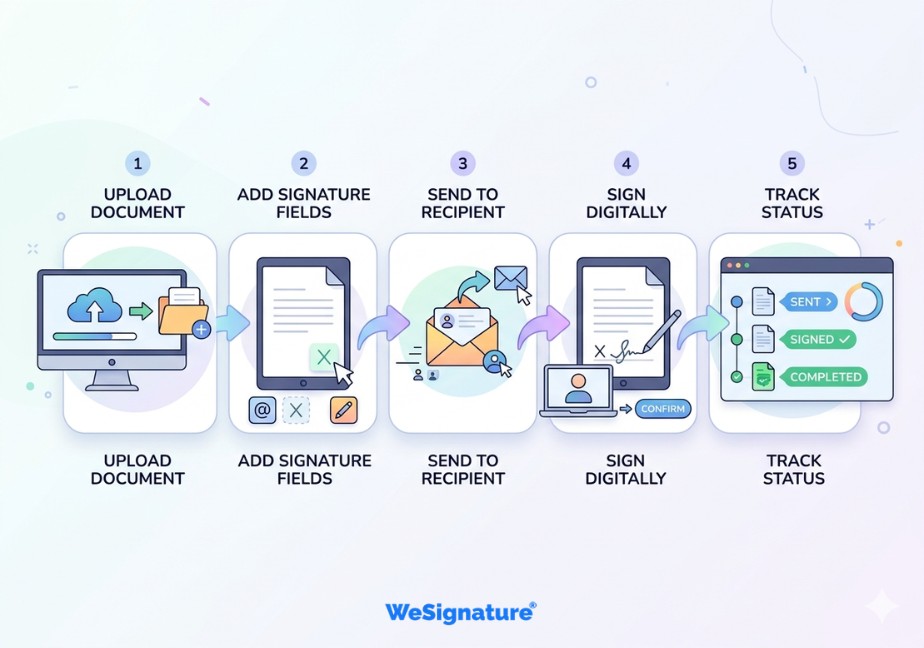
The end-to-end workflow behind online document signing is straightforward. Here is how it works on WeSignature:
- Upload the document — PDF, Word, Excel, or image. Drag-and-drop directly into the platform from any device.
- Prepare signature fields — Place signature blocks, date fields, initials, and checkboxes precisely where needed.
- Send to the document signer — Each recipient gets a secure email link. No account is required to sign.
- Signer reviews and signs — The recipient opens the document in any browser, reads it, and applies their signature.
- Track in real time — The sender receives instant notifications when the document is opened, signed, or declined.
- Store and audit — Completed documents are stored with a full, court-admissible audit trail — timestamped, IP-logged, and encrypted.
| Security at every step: Every action — from document open to final signature — is captured with AES-256 encryption. The resulting record is tamper-evident and legally defensible. |
Types of Electronic Signatures
Understanding the four main types helps you choose the right method for each document and jurisdiction:
1. Drawn (Handwritten) Signature
Created by drawing with a mouse, finger, or stylus on screen. The most personal and authentic-looking method — closely mirrors a traditional ink signature. Ideal for contracts, agreements, and any document where authenticity matters most.
2. Typed Signature
The signer types their name and the platform renders it in a professional signature font. Fast and convenient for low-risk approvals, consent forms, and high-volume document workflows where speed is the priority.
3. Uploaded Signature
A scanned image of the signer’s physical signature is uploaded and embedded directly into the document. Useful when consistency with existing physical records is required — though image quality can vary.
4. Digital Signature (Certificate-Based)
The highest-assurance form, backed by a cryptographic certificate from a trusted Certificate Authority. Provides mathematical proof of identity and document integrity. Required for government filings, regulated financial documents, and certain legal instruments.
| Type | Creation Method | Security Level | Best For |
|---|---|---|---|
| Drawn / Handwritten | Mouse, finger, or stylus | High | Contracts, agreements, legal |
| Typed | Keyboard + signature font | Standard | Approvals, forms, onboarding |
| Uploaded Image | Scanned signature file | Standard | Personal documents |
| Certificate-Based Digital | Cryptographic CA certificate | Highest | Government, finance, legal |
How to Create a Signature Online (Step-by-Step)
Creating your electronic signature on WeSignature takes under two minutes:
- Visit wesignature.com and create a free account — no credit card required.
- Open the Signature Creator from your dashboard.
- Choose your method: Draw (mouse, finger, or stylus), Type (pick a font), or Upload (existing signature image).
- Customise: Adjust pen thickness and size until your signature looks exactly right.
- Save to your account for instant, one-click reuse across all future documents.
| Mobile tip: Signing on a smartphone or tablet with your finger produces the most natural handwritten result. WeSignature is fully optimised for iOS and Android — no app download needed. |
| Also Read: How to Create a Handwritten Signature Online — Full Guide |
How to Sign Documents Online — PDF, Word, and Contracts
Once your signature is saved, applying it to any document signature field is instant. Here is how to handle the most common document types:
Signing an Electronic Signature PDF
- Upload your PDF to WeSignature
- Click ‘Place Signature’ and drag it to the correct field
- Add date, initials, or additional required fields
- Click ‘Finish’ — the document is locked and a signed PDF is generated instantly
Signing a Word Document
- Upload the .docx file directly — WeSignature handles the conversion
- Add signature fields and complete the signing process
- Download as a signed, sealed PDF for archival and sharing
Multi-Party Contract Signing
- Upload the contract and place fields for all required signatories
- Add each recipient’s email and set the signing order if needed
- Recipients sign via secure link — no account required
- All parties receive the completed, countersigned document automatically
| Bonus Read: Electronic Signature PDF — Sign PDF Documents Instantly |
| **Ready to Sign Your First Document Online?**Create your free WeSignature account and sign any document in minutes — no printing, no scanning, no delays. Start Signing Free → |
Benefits of Using Electronic Signature Software
Speed — Close Deals in Minutes
Documents that previously required days of postal transit are completed in minutes. Teams consistently report average signature collection times dropping from 3–5 days to under 30 minutes after switching to electronic signature online workflows.
Cost Savings — Reduce Overhead Significantly
Eliminating printing, postage, physical storage, and manual filing reduces document processing costs by 60–80% per document. According to Grand View Research, the global eSignature market is projected to surpass $35 billion by 2030, driven by exactly these ROI benefits.
Security — Tamper-Proof, Auditable Records
Every electronic signature is protected by AES-256 encryption and an immutable audit trail recording the signer’s IP address, timestamp, device, and location. Electronic signatures are demonstrably more secure than paper — there is no risk of documents being lost, altered, or misfiled.
Remote Access — Sign From Anywhere
Signatories can complete their document signature on any device — desktop, tablet, or smartphone — from any location, at any time. No geographic boundaries, no courier delays, no in-person meetings required.

Use Cases by Industry
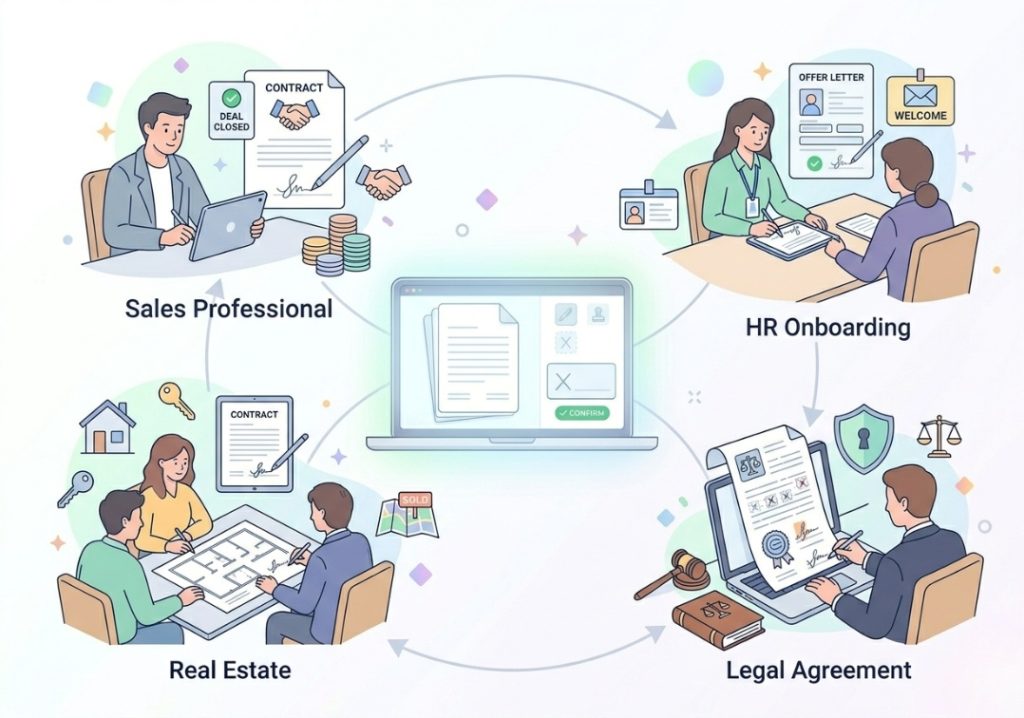
Sales — Close Contracts Without Delays
Sales teams use electronic signatures to send, negotiate, and close contracts without friction. Automated signing reminders and real-time tracking eliminate the need to chase prospects — reducing average sales cycle length by days.
HR — Streamline Onboarding from Day One
HR departments collect employment agreements, NDAs, policy acknowledgements, and benefits forms electronically. New hires complete all required paperwork before their first day — from any device, in any location.
Legal — Court-Admissible Document Records
Law firms and in-house legal teams use certified electronic signature online platforms to execute engagement letters, settlement agreements, and client authorisations — with audit trails fully admissible in court.
Real Estate — Execute Property Documents Remotely
Purchase agreements, lease contracts, and disclosure forms can be signed and countersigned across geographies within a single workflow session. According to the National Association of Realtors, remote document signing is now standard practice in over 70% of US real estate transactions.
Is Electronic Signature Legal?
Yes—in over 60 countries worldwide. Electronic signatures have carried the same legal weight as handwritten signatures for over two decades:
- United States: ESIGN Act (2000) and UETA — recognised in all 50 states
- European Union: eIDAS Regulation — covers all 27 EU member states with three tiers of signature validity
- United Kingdom: Electronic Communications Act 2000 — fully applicable post-Brexit
- India: Information Technology Act 2000 — legally binding for most commercial documents
- Australia, Canada, Singapore: Equivalent national electronic transactions legislation in force
| Important: Certain documents — including wills, property deeds in some states, and specific court filings — may still require wet ink signatures. Always verify local requirements for high-value legal instruments. |
| Also Read: Electronic Signature Laws — What Every Business Needs to Know |
Common Mistakes to Avoid
- Using a platform without an audit trail. Without timestamped, IP-logged records, your signed documents may not hold up if disputed legally.
- Ignoring jurisdiction requirements. eSignature laws vary by country, state, and document type — always confirm before signing critical instruments.
- Sending documents without placing signature fields. Missing fields delay the process and create confusion for recipients.
- Not saving your signature for reuse. Redrawing your signature every time leads to inconsistency and unnecessary delays.
- Using a generic free tool without compliance certifications. Ensure your platform meets SOC 2 Type II, GDPR, and applicable industry standards before processing sensitive documents.
- Failing to set signing order for multi-party documents. Without a defined sequence, documents can reach the wrong person first and stall the workflow entirely.
Why Use WeSignature?
WeSignature is a purpose-built electronic signature online platform designed for speed, compliance, and everyday ease of use. It is trusted across industries for everything from individual document signatures to high-volume enterprise workflows.
- Free plan available — create signature online with no credit card required
- Every device supported — desktop, tablet, iOS, and Android with full feature parity
- Globally legal — ESIGN Act, UETA, and eIDAS compliant out of the box
- Full audit trail — every action timestamped, IP-logged, and court-admissible
- Native integrations — Salesforce, Zendesk, HubSpot, Freshdesk, and more
- Bulk sending — reach hundreds of signatories simultaneously with personalised fields
- Reusable templates — build document templates once, deploy them endlessly for consistency and compliance
- Enterprise-grade security — AES-256 encryption, SOC 2 Type II certified, GDPR compliant
View our full feature set and explore WeSignature plans and pricing to find the right option — from individual free use to full enterprise deployment.
| Also Read: Best Electronic Signature Software — Compared for 2026 |
Frequently Asked Questions
1. What is the difference between an electronic signature and a digital signature?
An electronic signature is a broad category covering any digital method of signing — drawn, typed, or uploaded. A digital signature is a specific, higher-security subtype backed by a cryptographic certificate from a Certificate Authority. Both are legally valid; digital signatures offer the highest level of identity verification and tamper protection.
2. Is electronic signature free to use?
Yes — WeSignature’s free plan lets you create a signature online, sign documents, and send them to others at no cost. Advanced features such as bulk sending, CRM integrations, and branded signing pages are available on paid plans. See WeSignature pricing for a full comparison.
3. How legally binding is an electronic signature?
Electronic signatures are legally binding in over 60 countries under legislation such as the ESIGN Act, UETA, and eIDAS. They carry the same legal weight as a handwritten signature for the vast majority of commercial documents. Certain instruments — such as wills or notarised deeds — may require wet ink signatures depending on jurisdiction.
4. Can I sign a PDF electronically?
Yes. WeSignature allows you to upload any electronic signature PDF, place your signature, add date and initials fields, and download or share the completed signed document — all in under two minutes, on desktop or mobile.
5. What happens if a recipient refuses to sign electronically?
Electronic signing is always voluntary. If a recipient declines to sign digitally, you can offer an alternative — such as printing, signing physically, and returning a scan. WeSignature allows you to mark a document as completed with an alternative signature method while preserving the full audit record.
Conclusion
Electronic signatures have moved from a convenience to a competitive necessity. Every day a business runs paper-based signing workflows, it loses time, money, and customers to faster, more digitally mature competitors.
The legal framework is solid. The technology is mature. The ROI is measurable. The only question left is how quickly your organization makes the move.
WeSignature makes starting easy—a free plan, zero installation, and a workflow your team will learn in minutes. Whether you need to sign one contract or process thousands of documents a month, it scales with you.
| **Sign Documents Smarter. Start Free Today.**Join thousands of businesses using WeSignature to reduce delays, cut costs, and close faster. Create My Free Electronic Signature → |